Workwize Onboarding Case
Workwize's design case for a Senior Product Designer role: a delivery date means nothing until it is judged against the day the new hire starts.
- Year
- 2026
- Track
- design
- Category
- case-study
Tools
- Concepts
- Figma
- Claude Code
In October 2026 Workwize, a platform that ships, tracks and takes back IT equipment for distributed companies, set me a design case for a Senior Product Designer role: find the problem worth solving in how IT admins order equipment, and design the fix in high fidelity. My answer is one rule. A delivery date means nothing until it is judged against the day the new hire starts, so the design checks that one date at three moments, before the order, at the order and after it, and when a parcel comes back the admin hears first, with the recovery ready. I sent ten slides, a journey map, a Figma file and a working prototype. It was a hiring exercise and nothing shipped. Every screen on this page is that prototype, on made-up people and orders.
Prototype. Every person, company and order is made up.
It runs. See it running, at the foot of this page, opens the prototype at its own size in a new tab.
The admin orders, then chases
Workwize's brief named four pains. Unclear when equipment arrives was the second, and three customer quotes came with it. One of them, paraphrased as my deck printed it: tracking says early, and I still check every day whether it lands before Monday. I read the three quotes as three symptoms of one missing thing. The admin carries that question through every screen, and no screen answers it.
Whose problem first: the IT admin's. The order starts with them, Workwize's Terms make their company the party, and only they can act when something goes wrong. The new hire receives, so ordering by the new hire is left out. The admin's job, as I wrote it down: the right equipment before day one, without chasing, and to know early if it is at risk.
Delivery certainty passes all four tests
The research was done at a desk. I read the brief, Workwize's public API documentation, its Terms and its public pages, and I tallied 45 public voices from review sites and Reddit. I never saw the live product and I contacted nobody at Workwize. 27 of the 45 voices are invited reviews, so the positives are probably inflated, and the sharpest complaints sit inside those invited reviews. It is not a statistical sample, and no public number says how often an order misses a start date.
Four candidate problems came out of the brief and the tally. I put each through the same four tests, and one passes all four. Cost and fees is the loudest theme, but it is mixed and it is a commercial question, so I left the price out on purpose. Retrieval comes after the order. And Workwize's Terms already promise notice of a delay.
| Workwize points at it | Public voices | Breaks day one | Fixable at the order | |
|---|---|---|---|---|
| Delivery certainty: told late | Passes. 1 of its 4 pains, all three recent quotes | Passes. Silent failure: 12 of 14 negative, none positive | Passes. Yes | Passes. Yes: the data is on the order |
| Cost and fees | Fails. No | Fails. 10 of 21 negative, 9 positive | Fails. No | Partly. Clarity yes; the price is commercial |
| Selecting devices | Partly. Named, no quote | Fails. 9 of 20 negative, 7 positive | Partly. Rarely | Passes. Yes |
| Retrieval and redistribution | Partly. Pains 3 and 4, no quote | Fails. 3 of 9 negative | Fails. No | Fails. After the order |
Delivery certainty: told late
- Workwize points at it
- Passes. 1 of its 4 pains, all three recent quotes
- Public voices
- Passes. Silent failure: 12 of 14 negative, none positive
- Breaks day one
- Passes. Yes
- Fixable at the order
- Passes. Yes: the data is on the order
Cost and fees
- Workwize points at it
- Fails. No
- Public voices
- Fails. 10 of 21 negative, 9 positive
- Breaks day one
- Fails. No
- Fixable at the order
- Partly. Clarity yes; the price is commercial
Selecting devices
- Workwize points at it
- Partly. Named, no quote
- Public voices
- Fails. 9 of 20 negative, 7 positive
- Breaks day one
- Partly. Rarely
- Fixable at the order
- Passes. Yes
Retrieval and redistribution
- Workwize points at it
- Partly. Pains 3 and 4, no quote
- Public voices
- Fails. 3 of 9 negative
- Breaks day one
- Fails. No
- Fixable at the order
- Fails. After the order
Two of the three recent quotes in the brief track a device against a start date; the third heard of a failure from support. The Terms promise delay notice.
45 public voices · the brief · Terms · API
Go deeper
The 45 voices: 10 from G2's first page, 17 from Capterra, 5 from Trustpilot and 13 from Reddit that read as first-person experience. 27 are invited reviews, with an incentive behind them. Reddit is seeded by Workwize and by competitors. Counting the voices that raise each theme, negative first, then mixed, then positive:
- Exceptions and silent failures: 14 voices, 12 negative, 2 mixed, none positive.
- Delivery certainty, lead time and start date: 13 voices, 10 negative, 1 mixed, 2 positive.
- Tracking and status accuracy: 10 voices, 7 negative, 1 mixed, 2 positive.
- Notifications and channel: 5 voices, 4 negative, 1 positive.
- Price and fee clarity: 21 voices, 10 negative, 2 mixed, 9 positive.
- Ordering and product selection: 20 voices, 9 negative, 4 mixed, 7 positive.
- Support and account team: 20 voices, 4 negative, 3 mixed, 13 positive.
- HR sync, automation and integrations: 18 voices, 4 negative, 2 mixed, 12 positive.
- Retrieval, returns and offboarding: 9 voices, 3 negative, 3 mixed, 3 positive.
Across the three themes after the order, 29 of 37 mentions are negative and 4 positive. That is a count of who said what, never a rate.
The start date is never shown
Then I mapped the journey as the brief's four screens show it, with the public API and the Terms beside them, and no live observation. Eight stages, from the start date landing to day one. The platform already holds the start date, through the employee record, and every shipment carries its failure states and a history. None of the brief's screens shows either. So the admin learns of a problem from support, days later, and what the order shows is a lead time, not an arrival. Two of the severe failures are Workwize's own, a parcel stalled at the warehouse and a device marked delivered that is not in stock. Workwize's newer public screens show a status line and an estimate in weeks; the claim here is about the screens in the brief.
The highest-leverage move was not a new screen but a join between two things the platform already holds.
I scored the fixes by reach, severity relieved and data readiness, each from 1 to 3. Two of the three score the full 27, because the data is already on the order.
Fix A.
Start date
Opt-in reminder, no order-by day
Pick the person
Start never shown
Risk 2, a lead time, not an arrival.
Pick the products
No arrival date
Fix B.
Place the order
Binding, Cancel shown
Risk 1, told late, by support.Fix C.
Processing
No stall state
In transit
Tracked by hand
Arriving
Estimate: unavailable
Day one
The hire tells
Told late, by support A lead time, not an arrival The start date, never shown
Highest leverage, scored of 27
- Fix A:
Judge every date against the start date
reach 3 × severity 3 × data 3
27 of 27
- Fix B:
Make the confirm the commitment
reach 3 × severity 3 × data 3
27 of 27
- Fix C:
Tell early, with whose move
reach 3 × severity 3 × data 2
18 of 27
Reach × severity relieved × data readiness, each from 1 to 3.
One date, three moments
A notice, a timeline or an estimate can only say late against a start date, so the start date comes first and every other fix hangs off it. The new flow keeps the journey's eight moments and checks the one date at three of them. Before the order: who starts soon with nothing ordered, grouped by whose move, with the day to order by. At the order: the date comes from the HR system and is confirmed, not typed, and every product is sorted by when it arrives against it. After it: the estimate drawn as a line against the date, one timeline in plain words, whose move it is, and the recovery ready before anything goes wrong. Every screen answers five questions: what do I know, what do I predict, how sure, whose move, and what can I do now.
1 · Before the order
Check 1, before the order.
Start date lands
Order-by day shown
2 · At the order
Employee and date
Date from HR
Check 2, at the order.
Choose by arrival
Sorted by arrival
Review and place
What locks, said
3 · After it: told early
One timeline
House words, dated
Check 3, after it: told early.
Told early, once
One Slack thread
Prepared recovery
Default and options
Day one
Confirmed, or covered
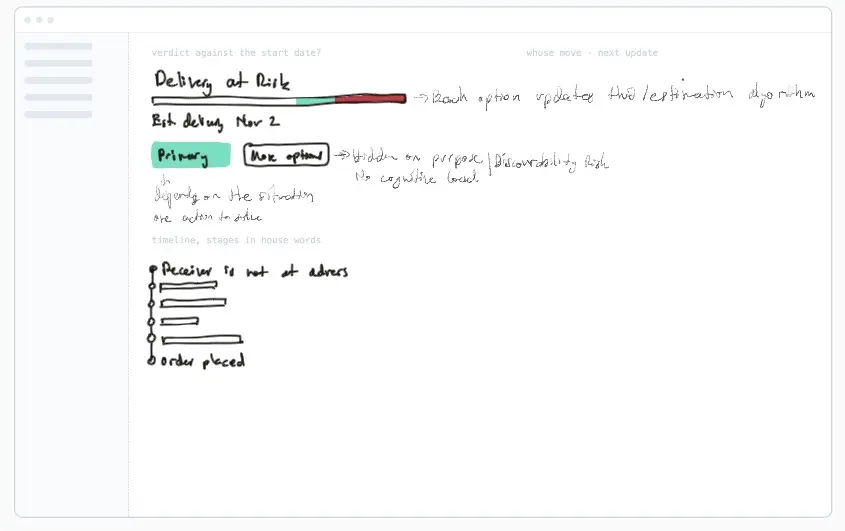
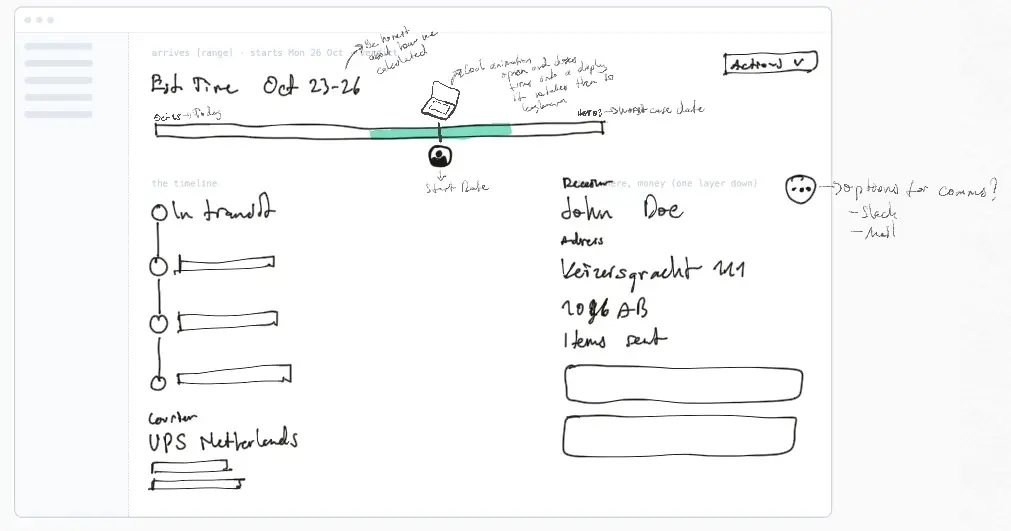
I drew it on the iPad first, over sheets with an empty screen frame on them. Five of the sketches are below, each beside the screen it became. The first sketch was the flow itself, four boxes with a Slack message as the trigger, and it froze as the eight moments above.
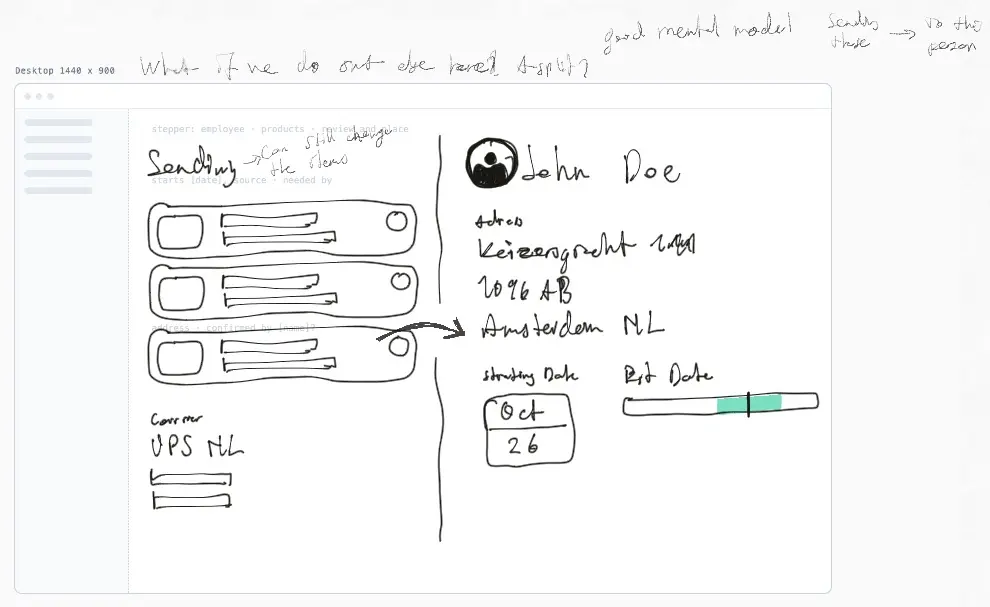
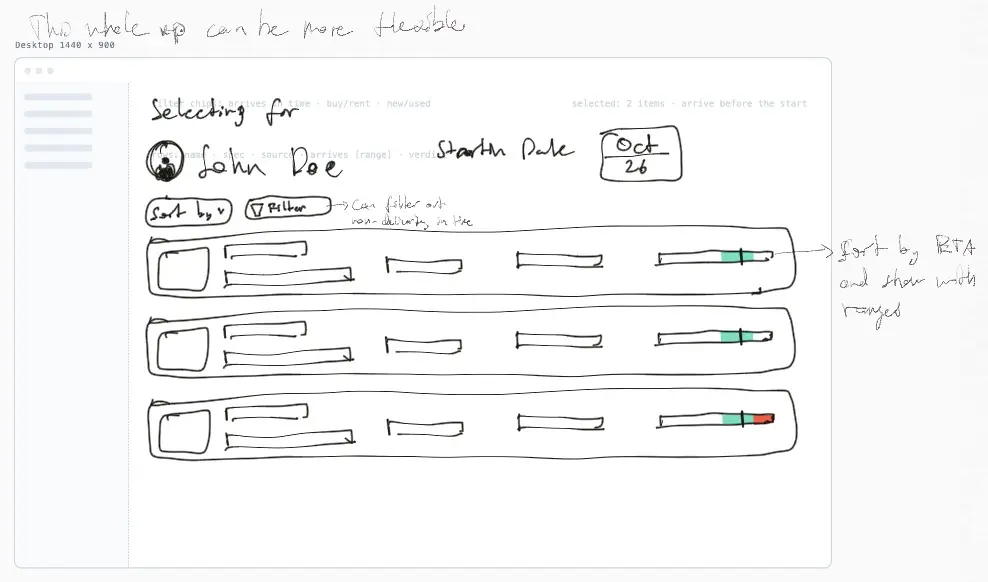
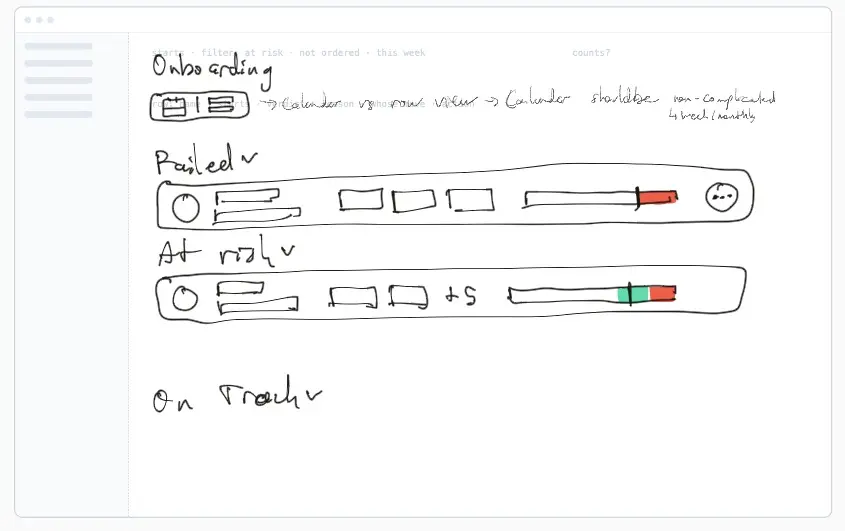
Prototype. Every person, company and order is made up.
Go deeper
What I weighed along the way, one line each. The readiness list grouped by whose move or by verdict. A calendar view beside the list, which the test killed. The start-date check inline on the rail rather than as a gate before step 2. Products as rows rather than a card grid. One prepared move on the order rather than a menu of actions. The failure headline as the event rather than the verdict. Costs on the confirm page rather than on a layer of their own. One way to draw the line against the start date at every width. A gesture to confirm, decided against on desktop. A confirm that tells rather than one that is tight. And the order window as a selector, which was logged and then built inside the scheduling sheet.
One IT analyst tried it
Then one person tried it. An IT analyst, not a Workwize customer, who onboards four or five people a month and keeps five to seven laptops on a shelf. One session of about thirty minutes on a video call, recorded with consent, thinking aloud through the live prototype: the onboarding list, a new order, a returned order and a stalled one. The Slack alert was not shown. The core idea held. The groups by whose move read without help, and on the returned order he took the recommended resend. Two controls did nothing when pressed, and three things were too quiet: own stock against new, the missing kit item, and a row with ten days of slack. Three things he said changed the design, and ten changes followed in all. One session validates nothing. The next round would be the same test with five admins from Workwize's customers.
Now I could resend.
Read the groups unaided; took the recommended resend
I prefer list.
Killed.
The lanes view, the day it was tried. It was removed after the session.
No, it's too early.
Now: no rush.
Daan's row on the start list: no rush, with the day to order by.
So in this case, I control the stock.
Keeps laptops on a shelf: a second persona to test
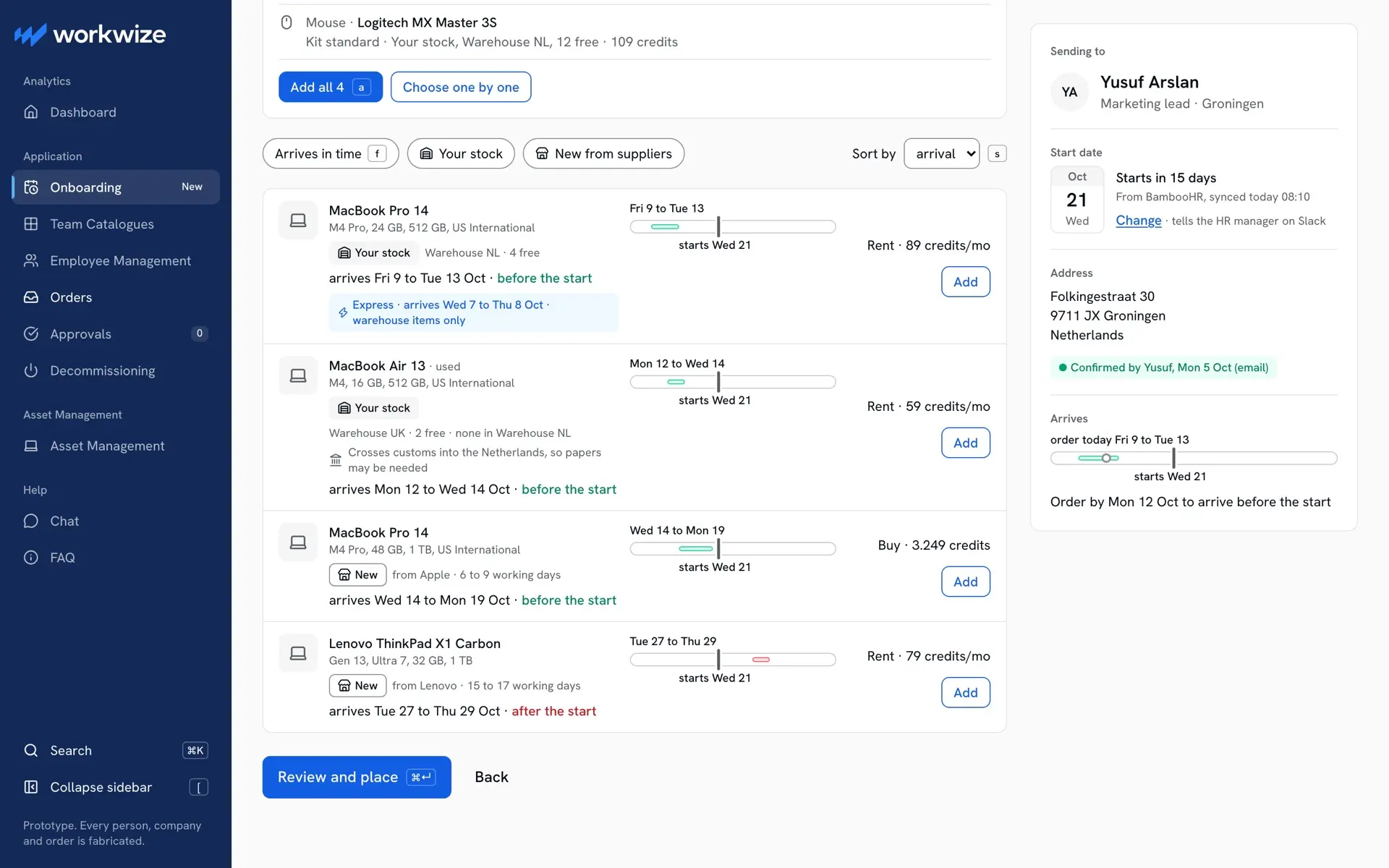
Every product row now says Your stock or New.
One session with one IT analyst, not a Workwize customer; the Slack alert was not shown. Next: five customer admins.
Prototype. Every person, company and order is made up.
Go deeper
The ten changes, in the order they were made. Express became a choice on the row, carried into the kit's estimate. Your stock against new from a supplier became a visible pill on every row, with a filter for each. The missing kit item reads as the next action. A row with room to spare says no rush, and when to order by. The lanes view went. Send to became a segmented control with a line naming the destination. The chosen person's strip lost its filled block. Two dead controls got handlers, and the change-date layer confirms after saving. An early order can be written now and scheduled for a suggested day, with the stock reserved at once, under a new group, Scheduled. And an assistant builds the kit with the admin and says why for each item. The last two came after the session, not from it.
The order starts from the start date
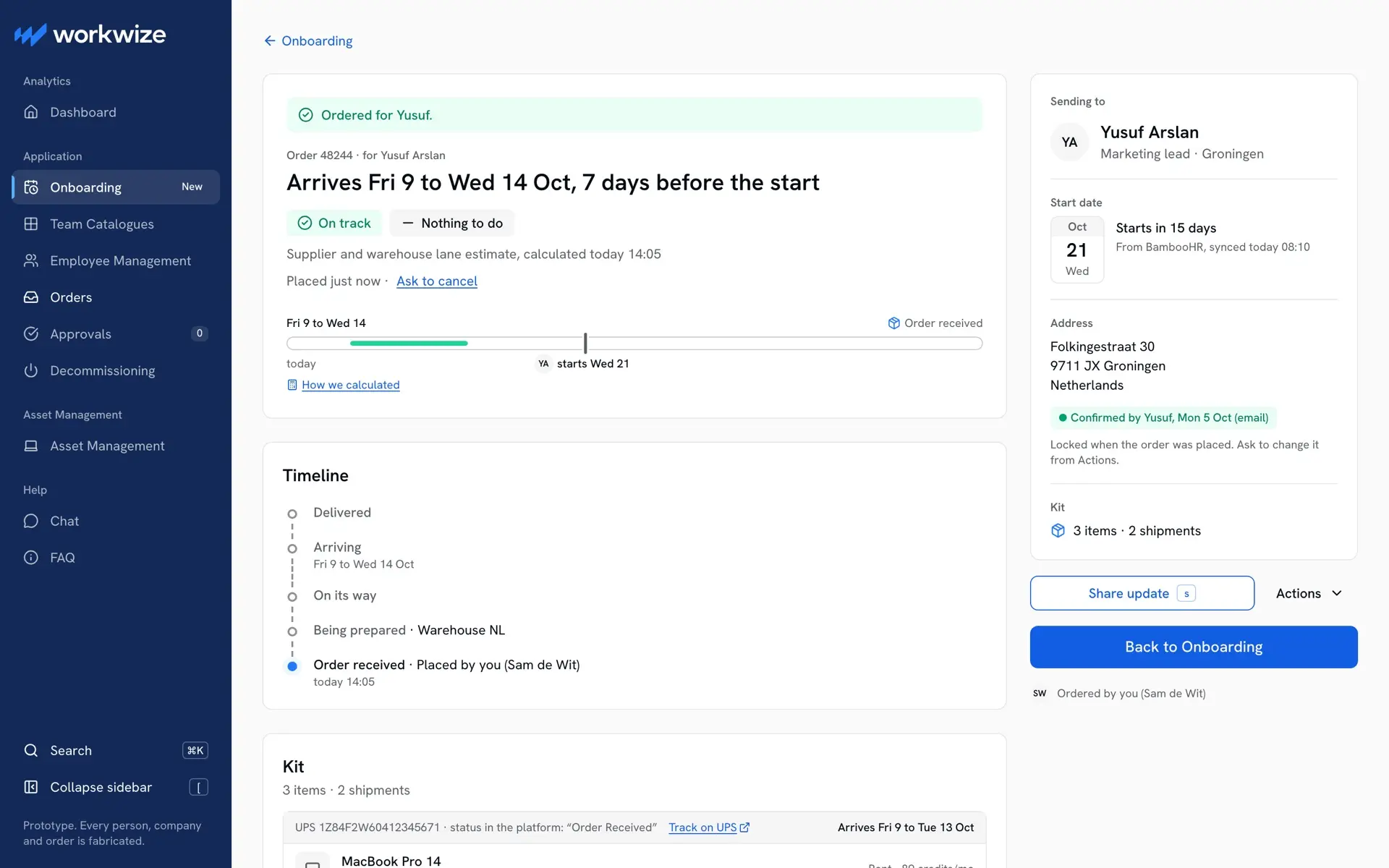
The order as sent, in five screens. The onboarding list opens on who starts in the next eight weeks, grouped by whose move, each row with its line against the start date and the day to order by. Step 1 takes the person, and the start date arrives with them from the HR system, confirmed by the admin and never typed; changing it tells the HR manager. Step 2 sorts every product by when it arrives against that date, your own stock beside new from a supplier, and a pick that would land after the start is allowed and confirmed, never blocked, because arrival is the sort and not a gate. A suggested kit comes with a reason for each item. Step 3 says what locks when you place it, the address and the items, which is what Workwize's Terms lock at submit. Placing is a commitment, so the order becomes the parcel on the person's card and the estimate becomes the line.
An order for Yusuf
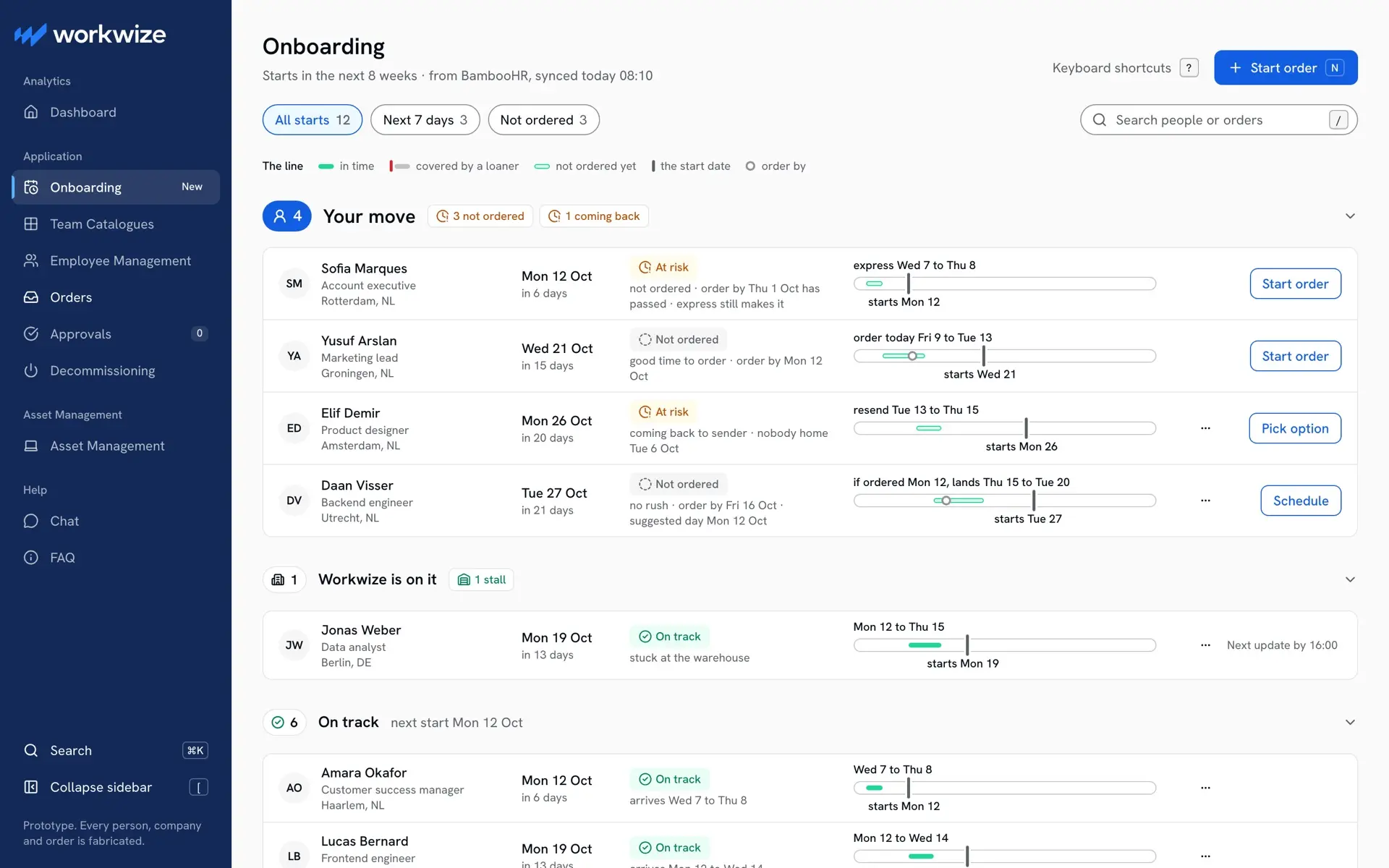
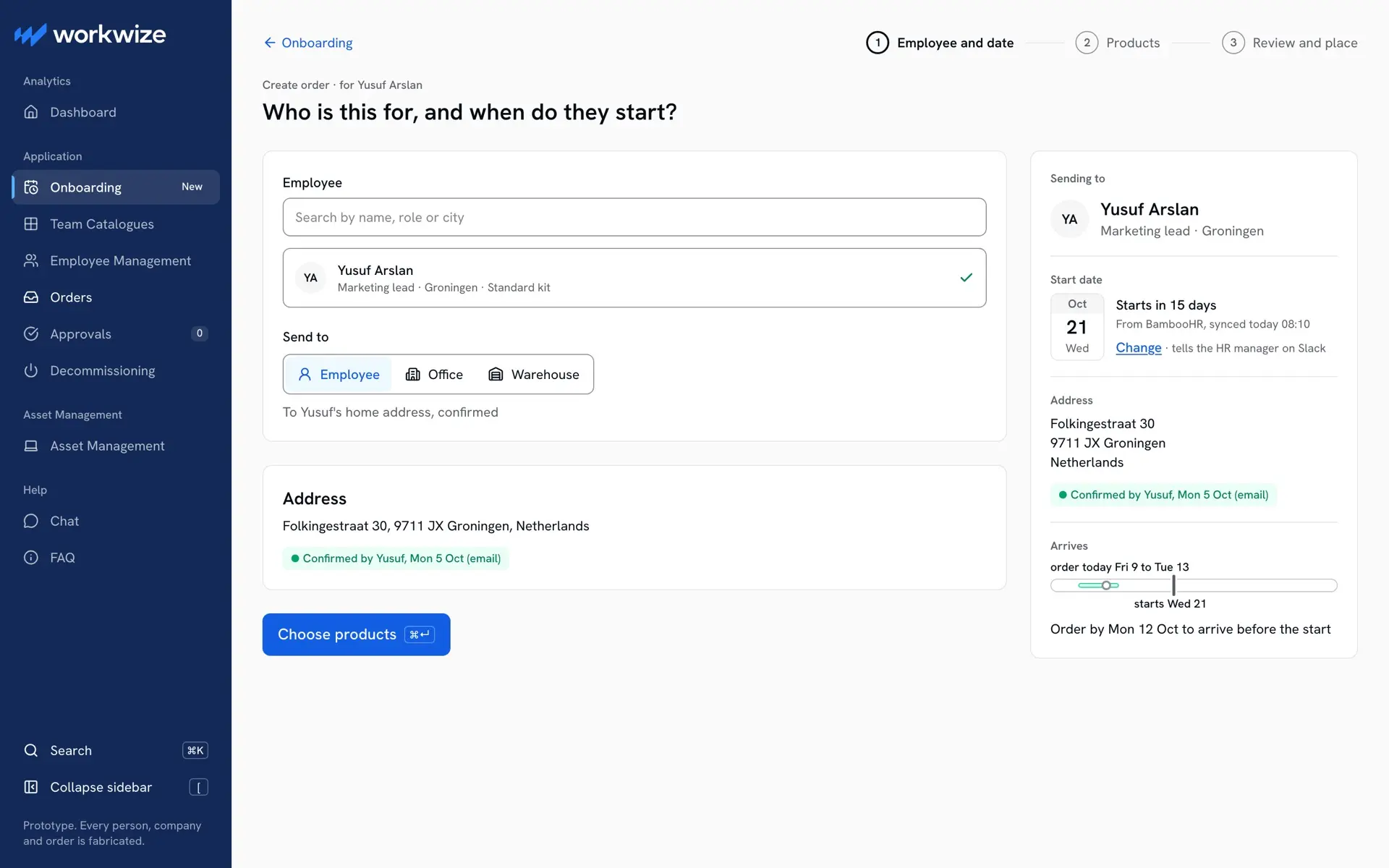
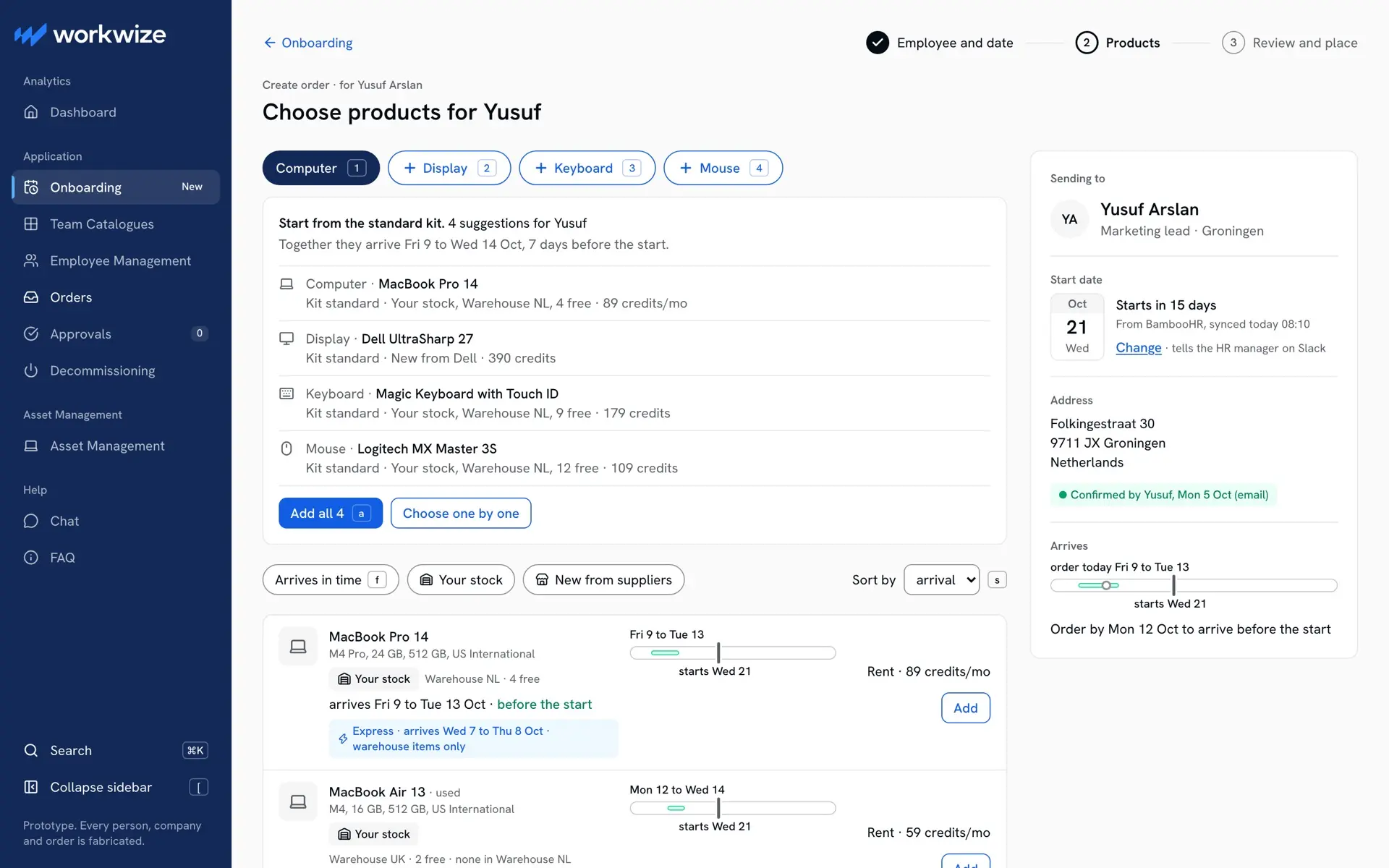
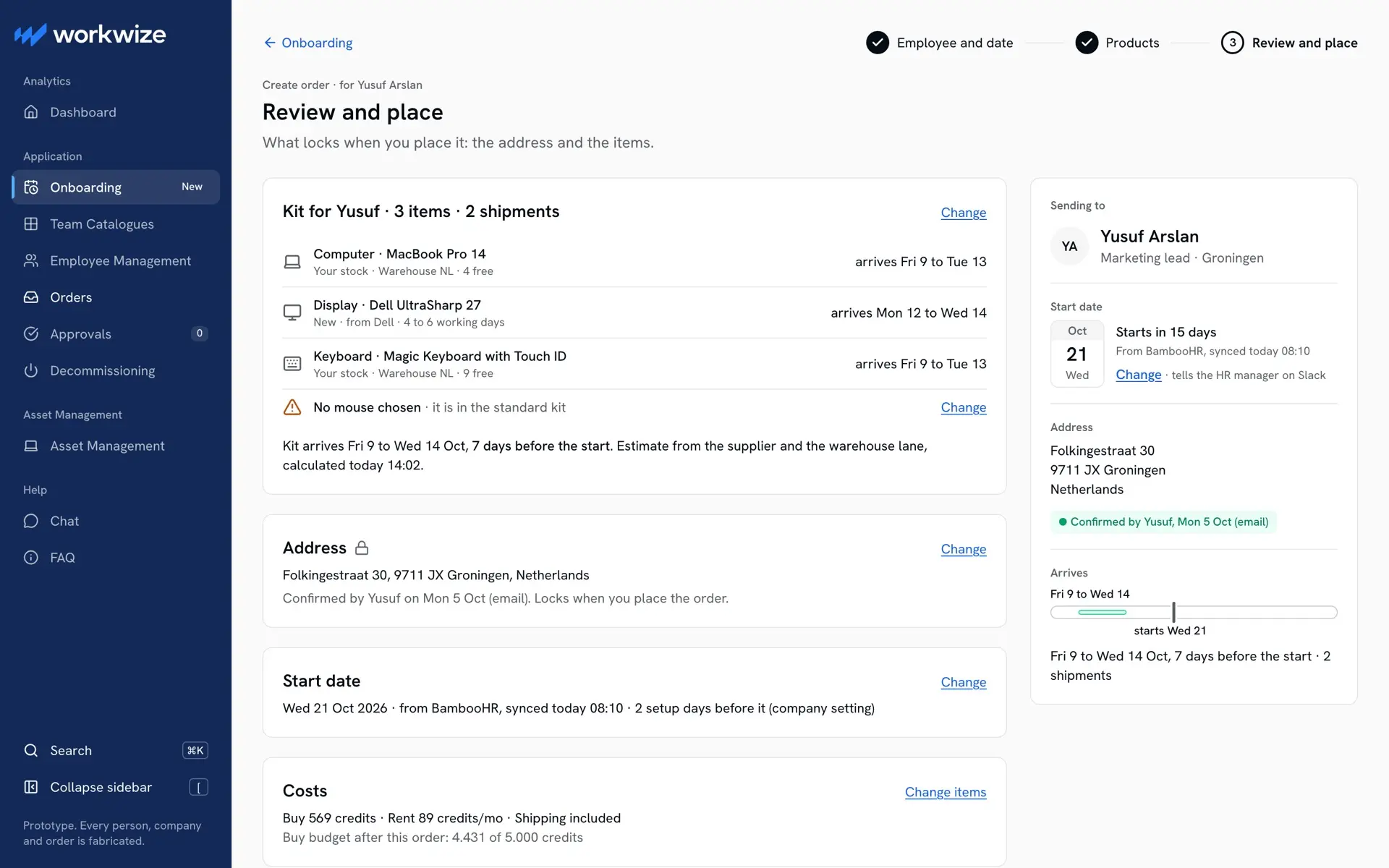
Prototype. Every person, company and order is made up.
Go deeper
Where the date comes from, and what happens without one. The start date is read from the employee record the HR system fills, and the admin confirms it rather than typing it. A person with no start date gets no verdict, since there is nothing to judge against, and the admin can add a date by hand. When HR moves the date, the order's line moves with it. The address goes to the new hire to confirm in one tap, because it locks when the order is placed.
Prototype. Every person, company and order is made up.
When it goes wrong, the admin hears first
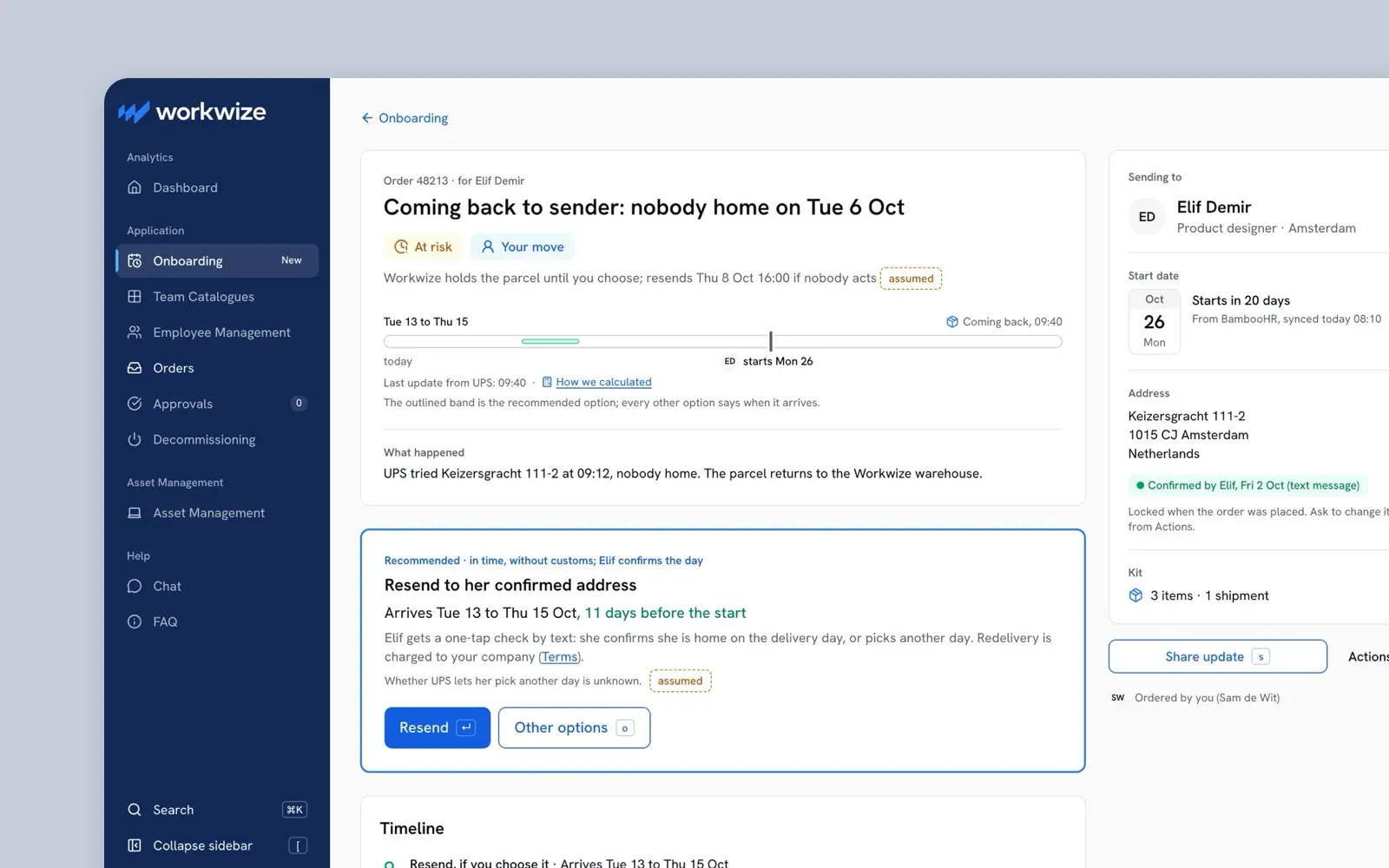
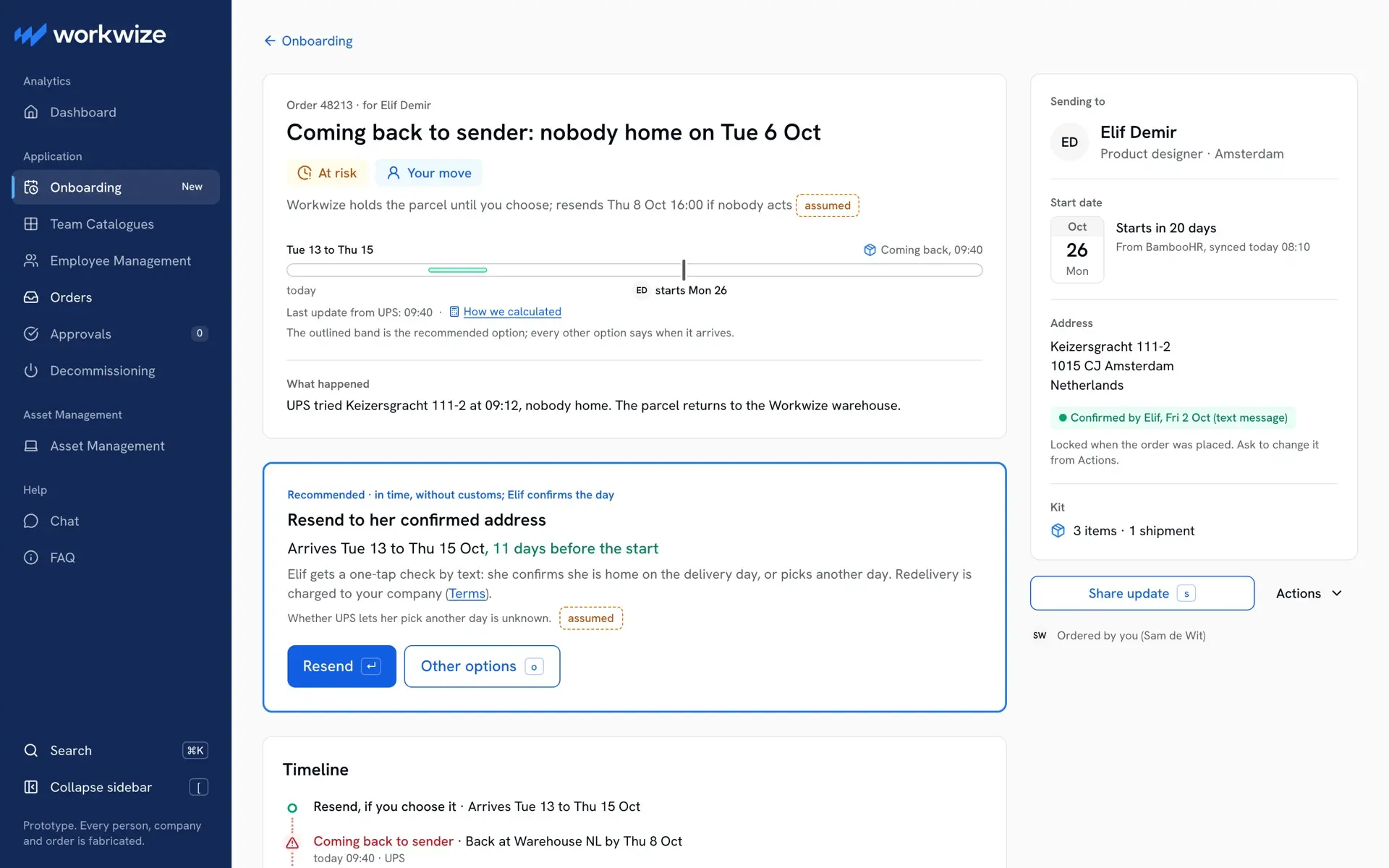
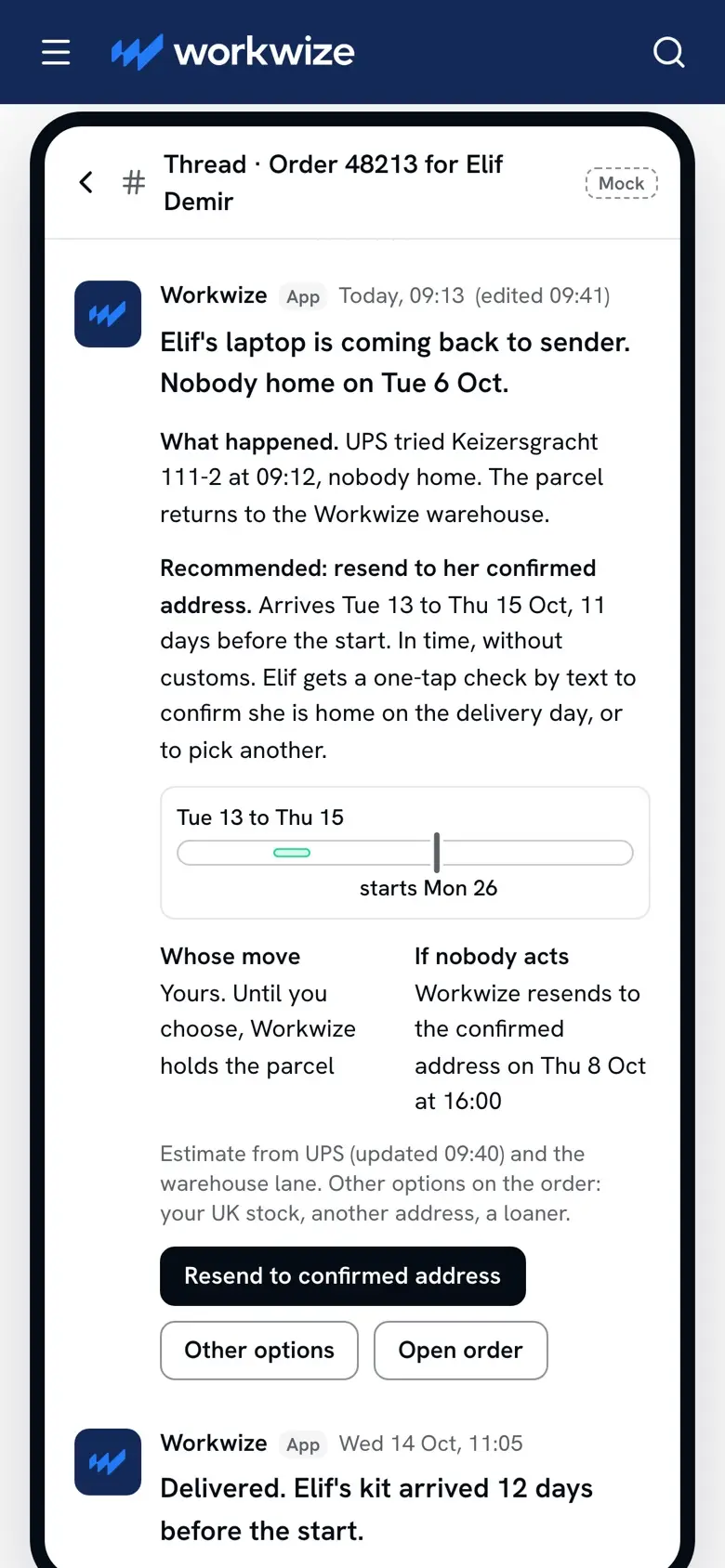
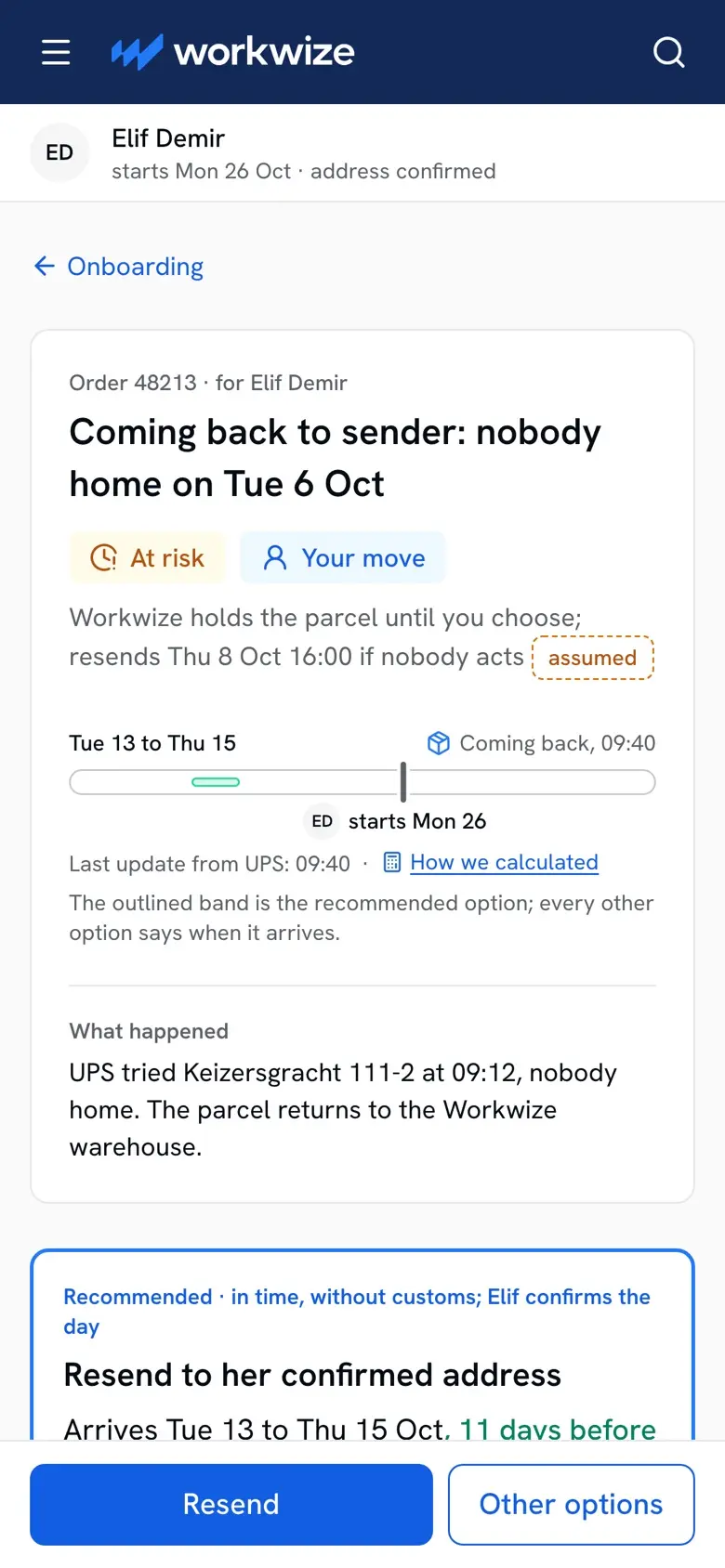
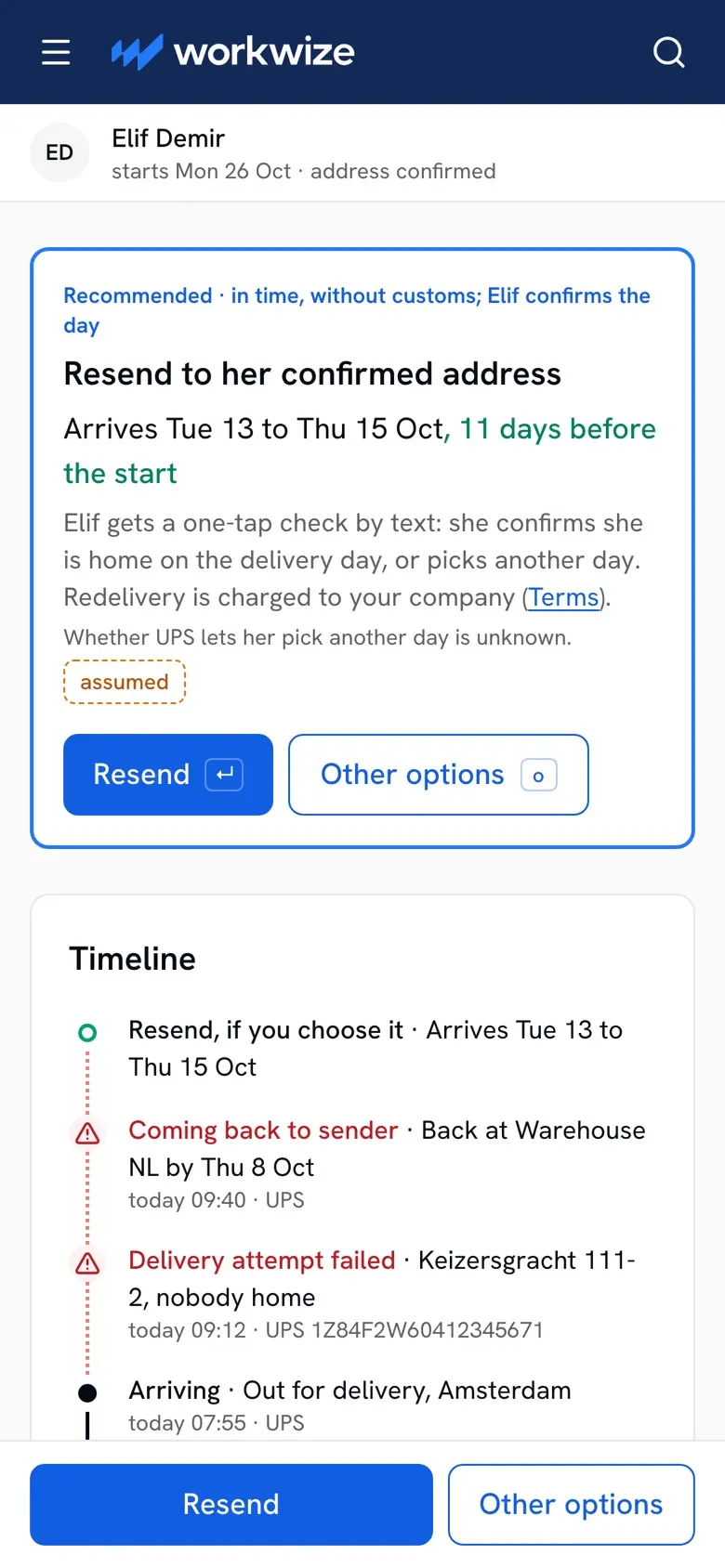
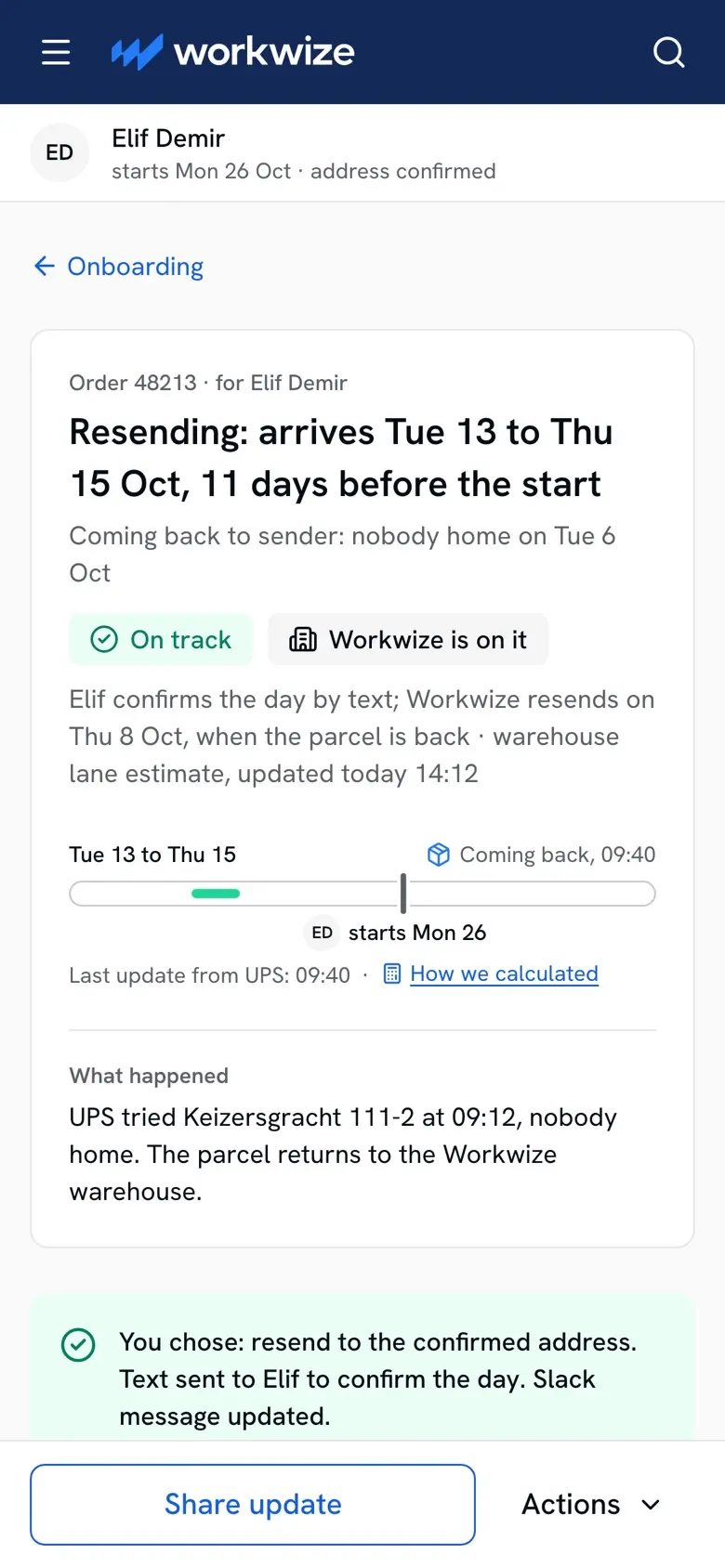
The failure is the deepest part of the prototype. Order 48213, placed for Elif, is coming back: nobody home. The headline is the event in plain words, not a carrier status. Under it the verdict, at risk, and whose move, yours. If nobody acts, Workwize resends to her confirmed address on Thursday at 16:00. That default is tagged assumed on the screen, because what Workwize does today is unknown, and it would be my first question for operations. One option is recommended, with its reason and the new arrival against the start, and the rest are one click away. The carrier's own text sits behind a disclosure, so the admin reads one vocabulary.
On the phone the Slack message carries the same words and the same buttons. Nothing is sent while an order is on track, and there is one thread per order, edited in place, so there is never a stale option to press. The resend takes one press, and the order says what you chose.
Prototype. Every person, company and order is made up.
Coming back to sender, on a phone
Prototype. Every person, company and order is made up.
Prototype. Every person, company and order is made up.
Go deeper
The failure states that can be walked in the prototype: returned to sender, a stall at the warehouse, a customs hold, no estimate yet, a late pick at ordering, a missing start date, an unconfirmed address, a start date moved by HR, an overdue parcel with no scan, late but covered by a loaner, an order-by day passed with nothing ordered, a kit in two shipments, the undo window, nobody acting on a failure, two vocabularies, and the scheduled order's three cases. Fourteen more are documented as frames, from a delivery after the start to a second failure on the same order. Who hears when a company has many admins was left out. Lost or damaged parcels, wrong items, returns, invoices, approvals and the new hire's own tracking page were not designed at all.
Two slots, never mixed
Before the rule, every row said its state in one slot and the words drifted. Not ordered showed in grey, amber and red. Workwize is on it came in two tones. Needs you and your move named one idea, and late but covered sat in green inside on track. A word that changes colour, or two names for one idea, makes the admin learn the screen twice. So every row and every order says two things, in two slots, and a word never moves between them or changes colour. The verdict slot answers one question, will it be there on day one: on track, covered or delivered for yes, at risk or overdue for maybe, late for no, and grey when nothing is judged yet. The whose-move slot has one name per actor: your move, Workwize is on it, the new hire's move, customs' move, nothing to do. An event, coming back to sender or stuck at the warehouse, never takes the verdict slot; it leads the reason or the headline. So a parcel stuck at the warehouse can still be on track, with Workwize on it, which is the point. Six states of one order are below. Late shows on a row in the prototype, and no order page renders it.
One order, six states
6 states

Nothing to do.

Nothing to do.

Nothing to do. We tell you if it tips.

Workwize is on it. Next update by 16:00 today.

Workwize is on it. Still on track if it ships by Thu 8 Oct.

Customs' move. No estimate until it is released.
Prototype. Every person, company and order is made up.
The first two weeks, then six
None of this ran. What went with the prototype is a plan in two parts. The first two weeks check the riskiest assumption before anything is built: is the delivery estimate usually right? Week one compares past estimates with real arrivals, route by route, while Workwize's own IT team places a real order and sees a new state of the prototype each day. It ends with a decision on how exact the promise can be. If the estimate fields are mostly empty, or arrivals fall outside the range on most routes, the promise becomes a date we confirm rather than a range. Week two ends with what gets built first. The measures are proposals. What the gap costs Workwize today is unknown, and no number stands in for it.
Then the six-week cut: build first what today's data already supports. One designer and two engineers is the frame of the question, not a known Workwize team. The sizes come from the journey map's effort per item, and engineering would confirm them at the end of week two, before anything is built.
The first two weeks: check whether the delivery estimate is usually right, before anything is built
Measure of success: new hires with their device delivered and confirmed before they need it, per route.
Leading signs: time from a shipment problem to the admin knowing; at-risk orders acted on the same day.
Check past estimates against real arrivals: Week 1.
Follow a real order with Workwize's own IT: Both weeks.
Interview admins, then test the prototype: Most of both weeks.
Measure what late devices cost today: Week 1.
- End of week 1: decide how exact the promise can be
- End of week 2: decide what to build first
Then test: alerts sent by hand to five busy accounts, then switched on route by route, so every account gets them and only the timing varies. Stop if over half the alerts prove false, or mutes or ordering time rise.
Build first what today's data already supports
The six-week cut: one designer and two engineers ship First; Next and Later are cut.
First · the data exists today
Show the start date on every order
Show each item's arrival against it
Alert once when a shipment fails or may miss the start
Next · needs an operations rule
Schedule an order for a later day
Show each recovery's cost before the choice
Share one order timeline with support
Later · needs new data
Spot a parcel stuck at the warehouse
Undo after placing, and customs updates
An ordering agent that checks the start date
Left out: ordering from the HR system, employee self-ordering, catalogue, approvals, pricing, offboarding, invoicing, reporting
Week 1 sets how exact First's arrivals can be; First also covers orders from the HR system.
What went to Workwize: ten slides, the journey map, the Figma file and the prototype, and I presented it in the interview. Every person, company and order in it is made up. I built it.
More case studies
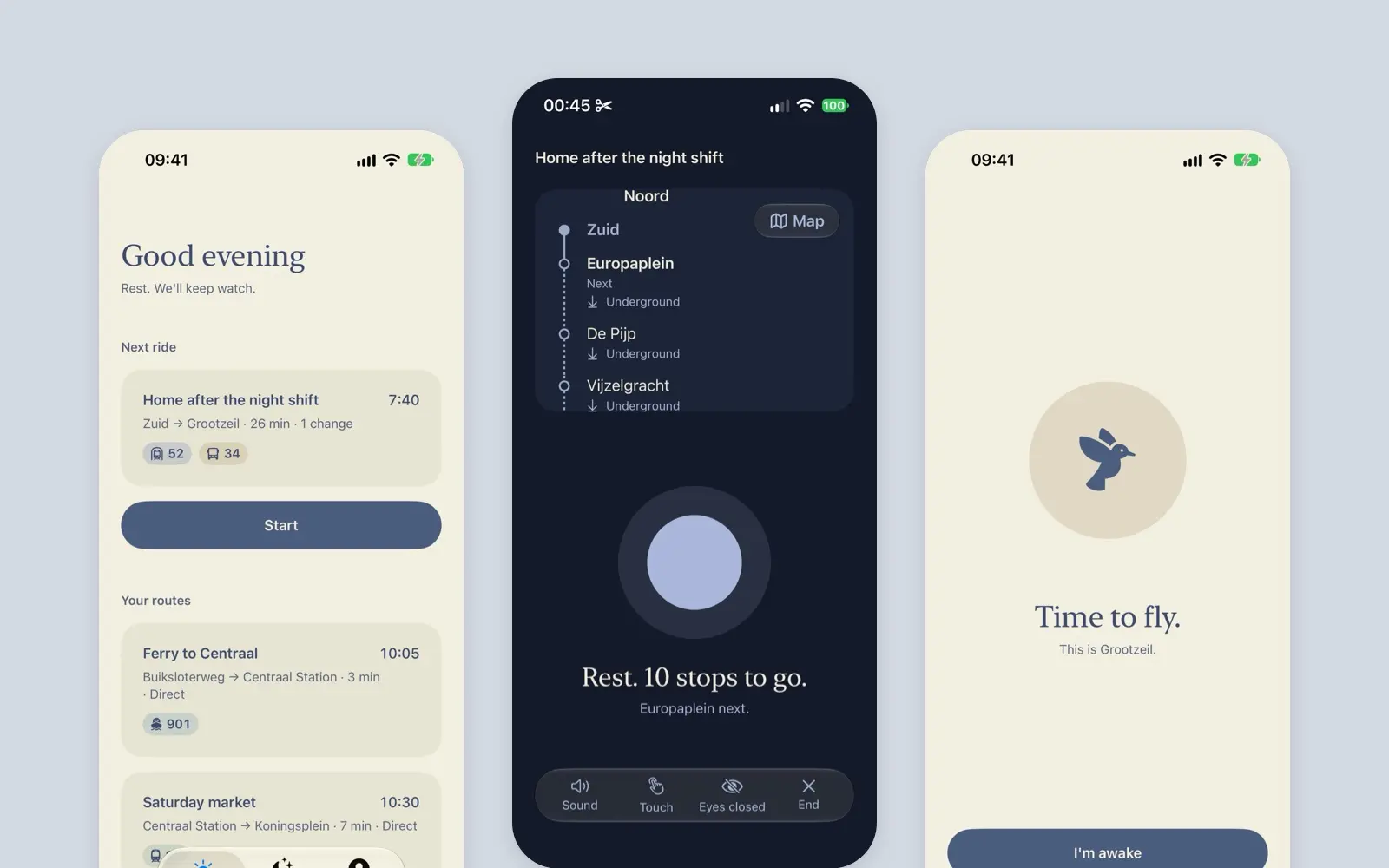
Soothe
A native iOS proof of concept that pats you until your stop is near, then wakes you kindly. A 2026 rebuild of my 2020 case study. Every ride is simulated.
case study · 2026 · wip · read it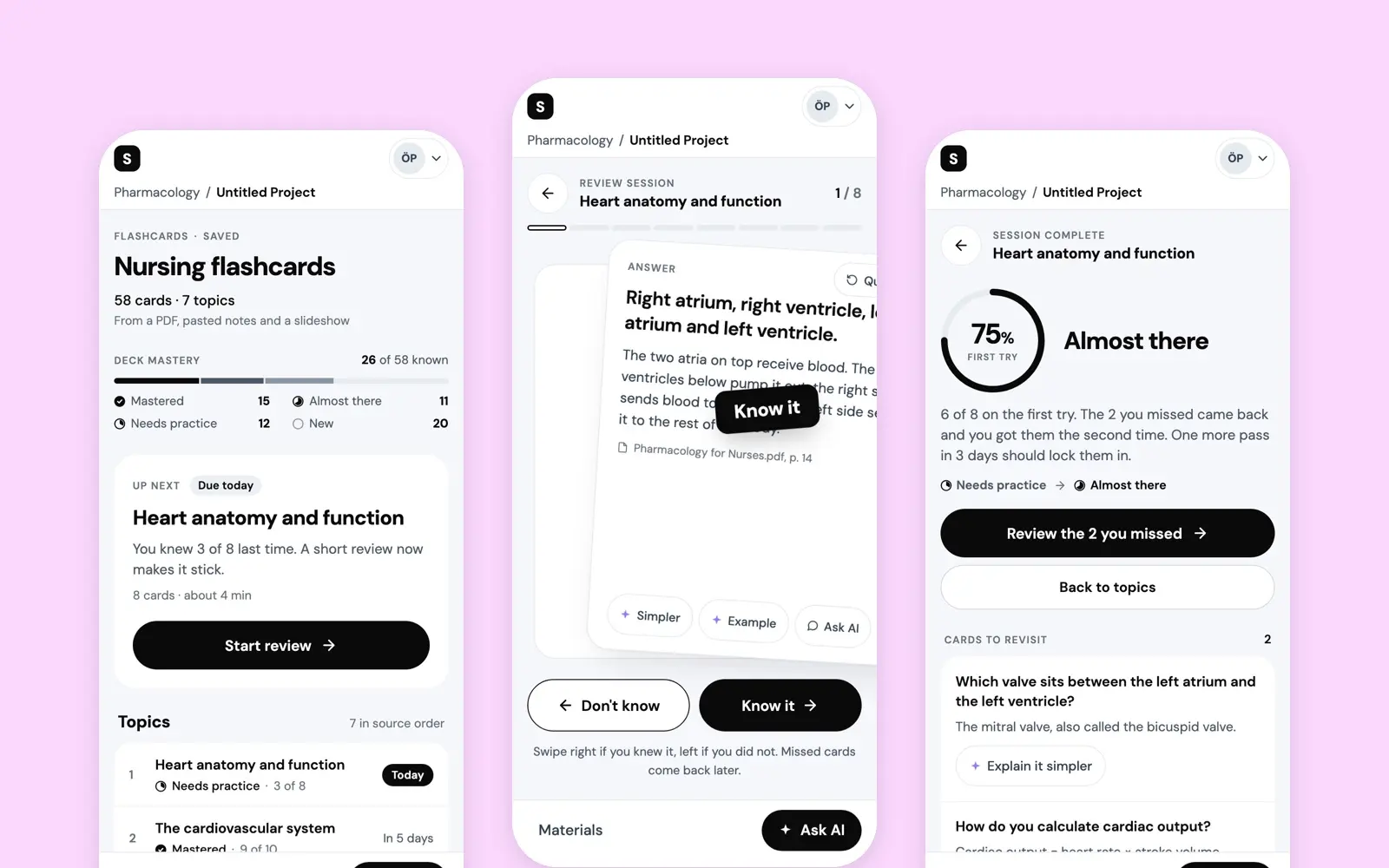
AI Flashcards
A short-term vision for the flashcards in Studocu AI: a deck made from a student's own sources, one rating per card, and a deck that says what to study next.
case study · 2025 · read it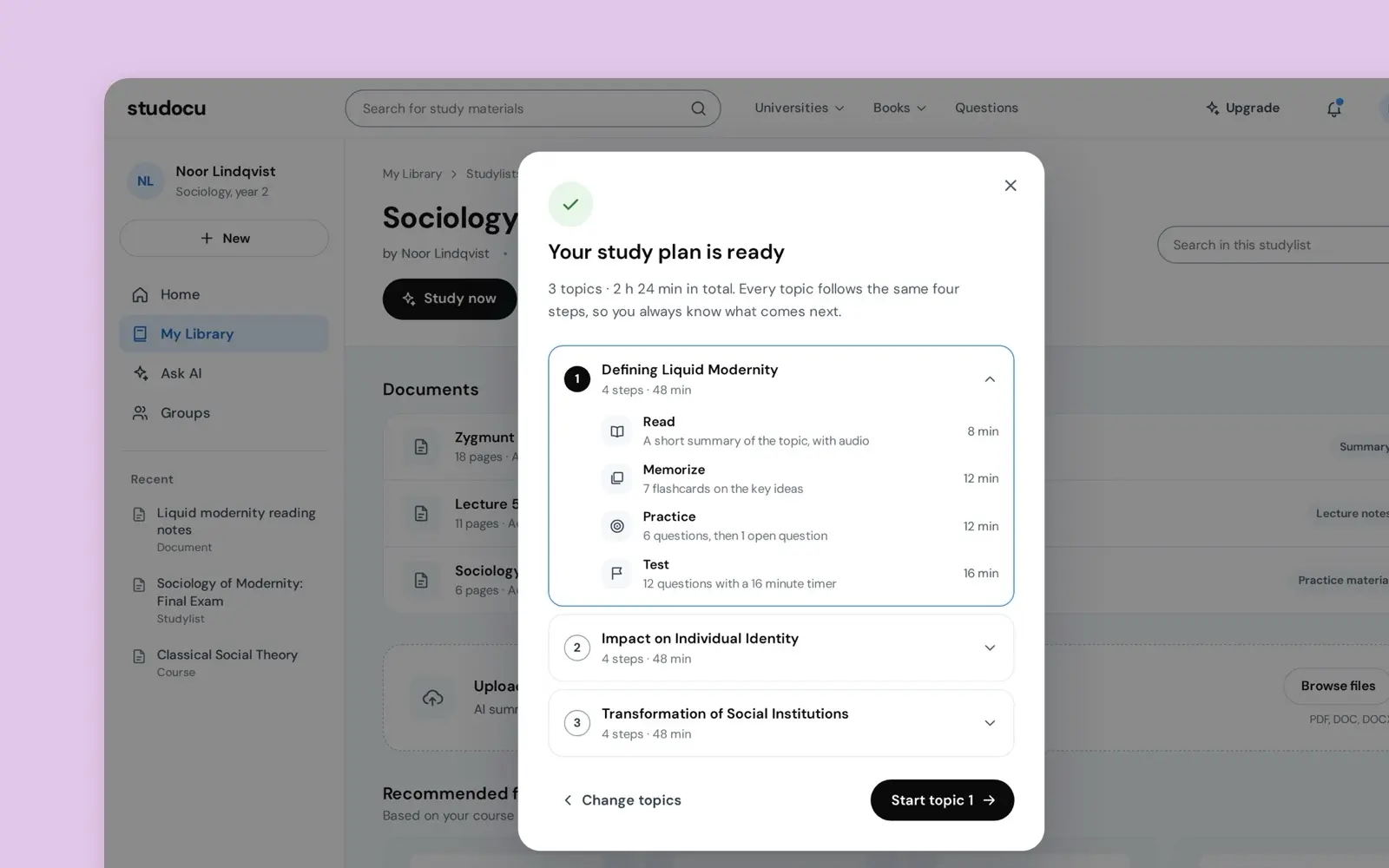
Multi-Modal Practice
A study session from one document: it finds the topics and takes each through four steps, read, memorize, practice, test, to a result made from what you did.
case study · 2025 · read it